
How your week is laid out
Home is today. Agenda is the fortnight. The calendar is the month. Between them they are the whole plan, and the empty days are on purpose.
Home is today. Agenda is the fortnight. The calendar is the month. Between them they are the whole plan, and the empty days are on purpose.
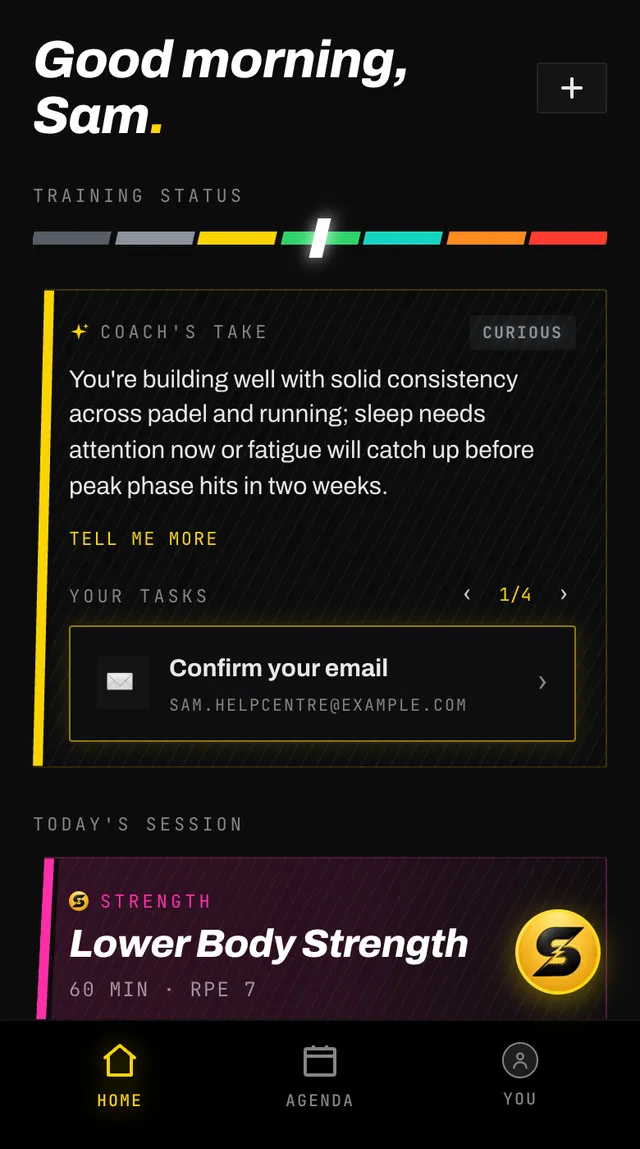
The top of Home is your training status and what your coach makes of it, then any tasks waiting for you, then today's session or sessions. Below that sit your next event, your goals and anything you have reported as a limitation.
Your coach's take is a sentence or two on how your training is going. It never names a day. While a baseline measurement is still to come, a line under it gives the next one and its day, such as Next measurement: Squat Baseline · Sat 3 Oct.
If today has nothing on it, Home shows a rest card rather than an empty space. Tapping it still opens the day, where you can add something if you want to.
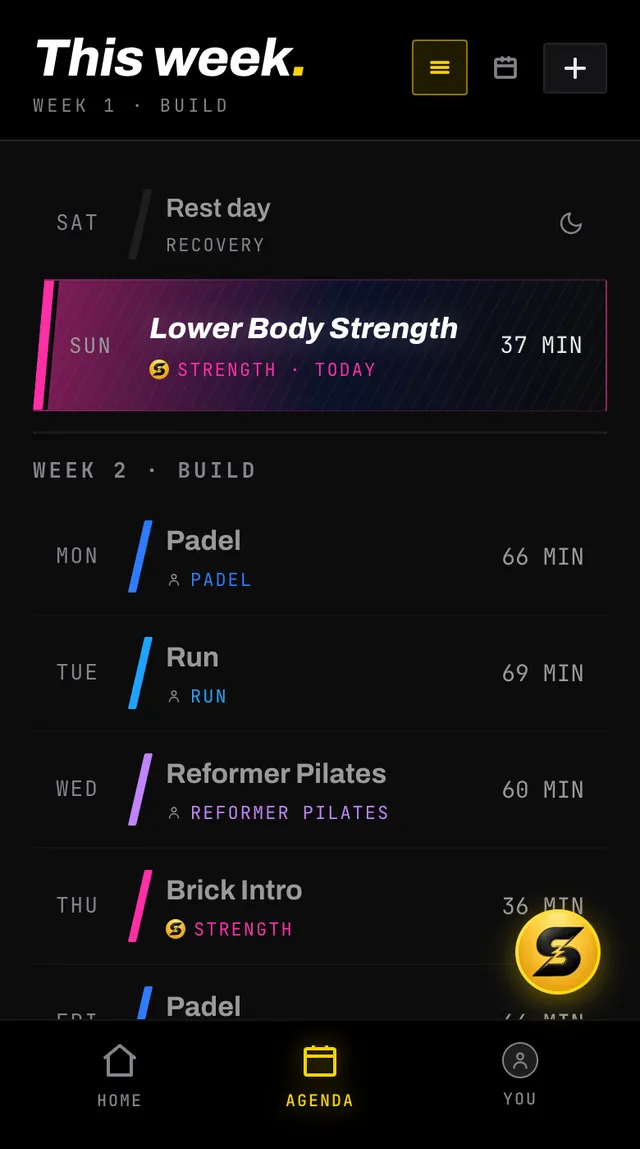
The list starts at yesterday and runs to two weeks from today, grouped by week. Each row gives the day, the session and its length. Rest days appear as rows too, so you can see the shape of the week rather than guessing at holes.
A coach session's length is added up from its exercises, so a move done on each side, like a stretch held 40 seconds a side, counts both sides.
The header tells you which part of the plan you are looking at as you scroll, from This week through Next week to Future, with the training phase underneath.
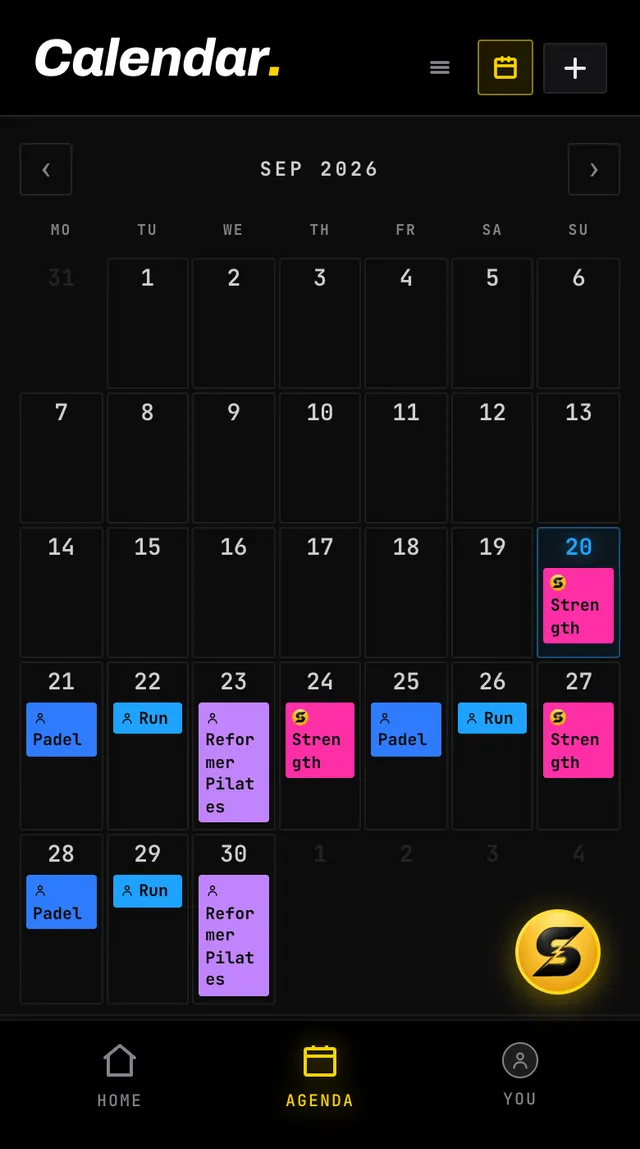
The calendar button in the header switches views. Each day carries one pill per session, coloured by sport, with your event marked in gold. Done sessions are faded and skipped ones are struck through, and the legend at the bottom names each state.
Tap any day, anywhere except one of its sessions, and a plus appears; tap it again to add a session to that day. A past day logs one you have already done, today or a future day schedules one. Tapping a session itself opens that session instead.
There is no such thing as a stored rest day. Your coach plans the number of sessions you set under Coach sessions, works them around the sports you already do, and leaves everything else alone. The empty day is the recovery.
Across the fortnight it plans, your coach keeps one day off in any seven days in a row, with nothing on it at all, not even a class, whenever your own sports, classes and Fixed days leave one free. When few days are free, a coach session goes beside your lightest class or sport, at easy or moderate effort, rather than take that day. A session that cannot move without breaking another rule stays put, so now and then a week still goes without one. If your own sessions or Fixed days fill every day, or you asked for seven sessions a week, that is your call, and the plan leaves it alone.
A coach session never goes beside a hard class, such as BodyPump or another group strength class, HIIT, CrossFit, Bootcamp, BodyCombat, spinning or hot yoga, while another day of that week can take it. Your coach puts it on another day, and if a plan still comes out with one there, the app moves it before the workout is written. When a week has more than one to move, it places them together so the fewest stay beside a hard class, a hard session or a measurement before a lighter one. A moved session takes an empty day first, even the day after a hard class, so it stays as your coach wrote it; between two empty days, a hard session or a measurement takes the one away from your hard classes. Moved beside one of your own sports or light classes, a session becomes easy or moderate and 45 minutes at most. A race simulation or a benchmark is never made easier to move: a simulation goes only to a day with nothing on it, and a benchmark goes beside one of your own sessions only when it is already easy or moderate and 45 minutes at most. A session stays beside a hard class only when no other day of that week can take it: never today, nor a day that holds or is given another coach session or has a hard class, is your day off, the day before one of your matches, a day you are away or race day (for a measurement, the days around a race too), nor one where it would break another rule of your plan, such as making that week too heavy. A hard session never goes beside any class or onto a match day. It also stays when you fixed that day for coach sessions. A hard session left there goes back to your coach to redraw, though now and then one still comes through. A light class such as Pilates or yin yoga can still take an easy or moderate session.
The one exception: a week that came back with fewer coach sessions than you asked for says so in a line at its top, and its empty days read Not planned yet until that week changes or your coach next rebuilds your plan, whether or not that rebuild finishes.
If your week looks too light or too heavy, the number to change is Coach sessions per week, not the individual days.
Open the app, go to You, and tap the feedback row at the bottom. It reaches a person, not a queue. Or write to hello@smashcoach.app.