
Skip to content

Set how often you train

One number decides the size of your week: how many sessions your coach may plan on top of the sports you already do.

Where to find it

Go to You. At the top of your sports stack is a row called Coach sessions, showing how many a week and roughly how long. Tap it.

If you have never set it, the row reads that your coach assumes around three a week, which is what it has been working to.
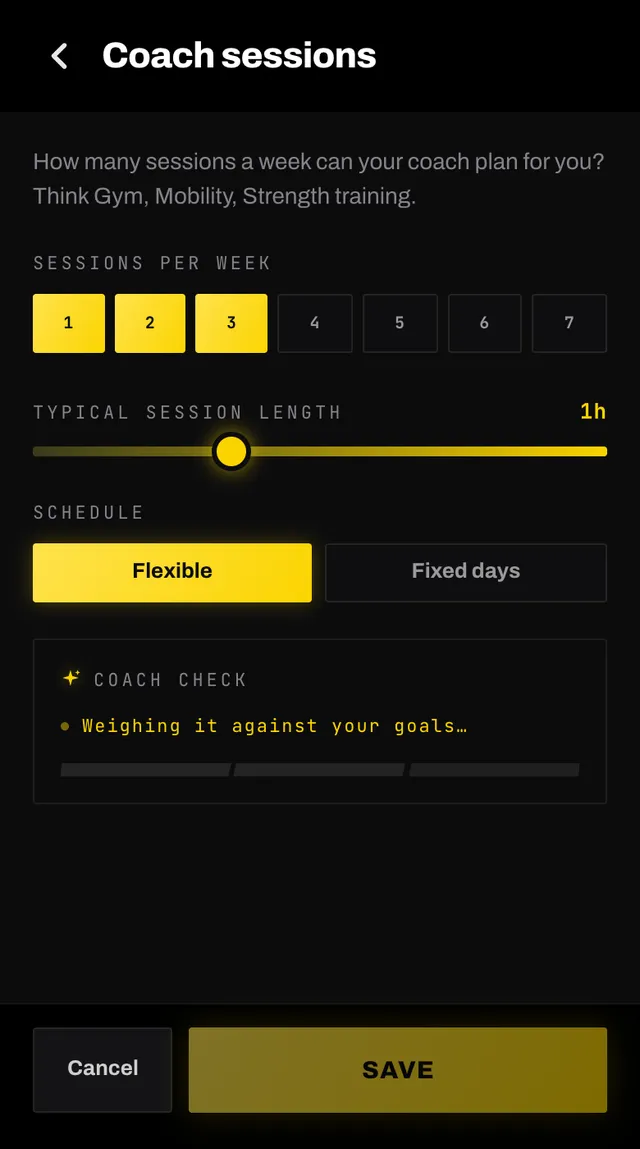
The coach sessions panel with pills for sessions per week, a flexible or fixed days toggle and a session length slider

What you can set

  • Sessions per week, from one to seven. This is strength, conditioning and mobility work, not your sports.
  • Typical session length, from half an hour to three hours. Your coach plans each session around it, shorter for a recovery day (an hour at most), an easier week or a measurement, then writes the workout to fill the length it planned, and rewrites one that comes out well short. A move done on each side counts for both sides there too, so a half-hour stretching day stays about half an hour. Each measurement session in your baseline week is about 40 minutes, or your usual length if that is shorter.
  • Schedule, either Flexible so your coach chooses the days, or Fixed days where you pick them yourself. You can fix fewer days than sessions: your coach uses every day you fixed and fits the rest wherever they work best that week. Fix as many days as sessions and every session lands on one of them. If the app has to move one there, it drops the coach's note and the reasoning written for the day it came from; the workout itself is written for the day it lands on.

A card underneath gives a live read of whether that adds up to what you are training for, from NEEDS MORE through ON TRACK to PLENTY.

How your coach treats it

As a promise, and a cap. Set three and you get three coach sessions a week, never more, however much runway there is before your race. A week only gets fewer when it has no free day left: after a trip, for example, or with Fixed days when your race falls on one of them, since race day carries no coach session. The days it does not use stay empty, which is the rest.

The sports you do are added on top. Four padel sessions plus three coach sessions is a seven-session week, and the coach knows that when it decides how hard each one should be.

Saving rebuilds your plan around the new number, which takes a few minutes. Changing this number is the one setting that also reworks your next few days, so a session already planned for tomorrow may become a different one. Sessions you moved or edited yourself are never touched.

Common questions

Do my own sports count towards this number?
No. This is the strength and conditioning work your coach programs on top of what you already do. Your padel, running and classes are set up separately under each sport.
Is it a target or a limit?
Both. Your coach plans this many coach sessions each week and never more. A week gets fewer only when it has no free day left (a trip, or with Fixed days a race on one of them), and if a plan ever arrives short anyway, the app tells you. Ask for an extra one in chat and it sits on top, as a card you confirm.
What does Flexible mean?
Your coach picks the days, working around the sports and classes you have already told it about. Choose Fixed days instead if certain days are the only ones that work.
Can I pick more fixed days than sessions?
No. The extra days are greyed out. Raise the sessions per week first if you want more days available.
Can I pick fewer fixed days than sessions?
Yes. Your coach uses every day you fixed and fits the remaining sessions on whichever other days suit that week. Fixing three days for five sessions gets you five sessions, not three.
Does changing this rebuild my plan?
Yes. Saving reworks your whole fortnight around the new number, which takes a few minutes. This is the one change that can also rework your next few days, so a session already planned for tomorrow may become a different one. Anything you moved or edited yourself stays put.

Still stuck

Open the app, go to You, and tap the feedback row at the bottom. It reaches a person, not a queue. Or write to hello@smashcoach.app.