
Sport settings
Tapping any sport in your stack opens how it fits your week. These few numbers are most of what your coach knows about your load outside its own sessions.
Tapping any sport in your stack opens how it fits your week. These few numbers are most of what your coach knows about your load outside its own sessions.
At the top of the page is a line about what that sport does to your body. That is not decoration. It is what your coach is working around.
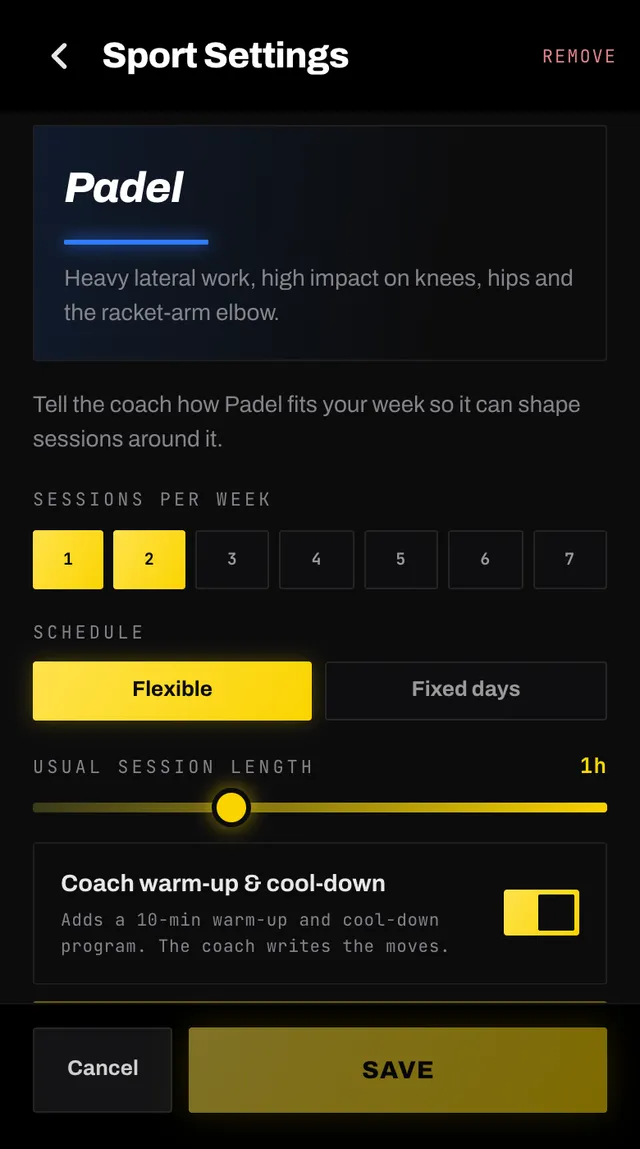
Coach warm-up and cool-down adds a short warm-up and cool-down around your own session, written by your coach when it plans that part of your week. For a group class it offers an activation routine to do before the class instead.
Add performance training tells your coach you want to get better at this sport, not just survive it. It creates a goal for that sport, which means it counts towards your three goals, and can be refused if you are already at the cap.
REMOVE sits in the header. The sheet tells you what goes before you confirm: your coach stops planning that sport, any performance goal for it is removed, and your logged history stays exactly where it is.
If you had edited any of that sport's sessions yourself, those stay on your agenda, because they belong to you.
Changes are not live until you tap Save, and leaving with unsaved ones asks first. Saving rebuilds your plan around the new shape of your week, which takes a few minutes. The sport's sessions for the next four weeks are written again on its days, apart from any you edited, rescheduled or duplicated in the app: those stay where they are, and the day a rescheduled one left is one of its days again. Sessions in those weeks you skipped or already completed stay too, and do not stop a new one being written on the same day.
Your other sports keep the sessions they have. If your save changes the days a Flexible sport needs, its new weeks go on its new days, or all of the next four weeks when you save that sport too.
Open the app, go to You, and tap the feedback row at the bottom. It reaches a person, not a queue. Or write to hello@smashcoach.app.