
Set and rank your goals
Your race sits at the top and everything is built around it. Under it you get three goals, in the order you care about them.
Your race sits at the top and everything is built around it. Under it you get three goals, in the order you care about them.
On Home, find YOUR GOALS and tap MANAGE, or tap any goal card. That is the only route in, so if you are hunting the You tab for it, you are in the wrong place.
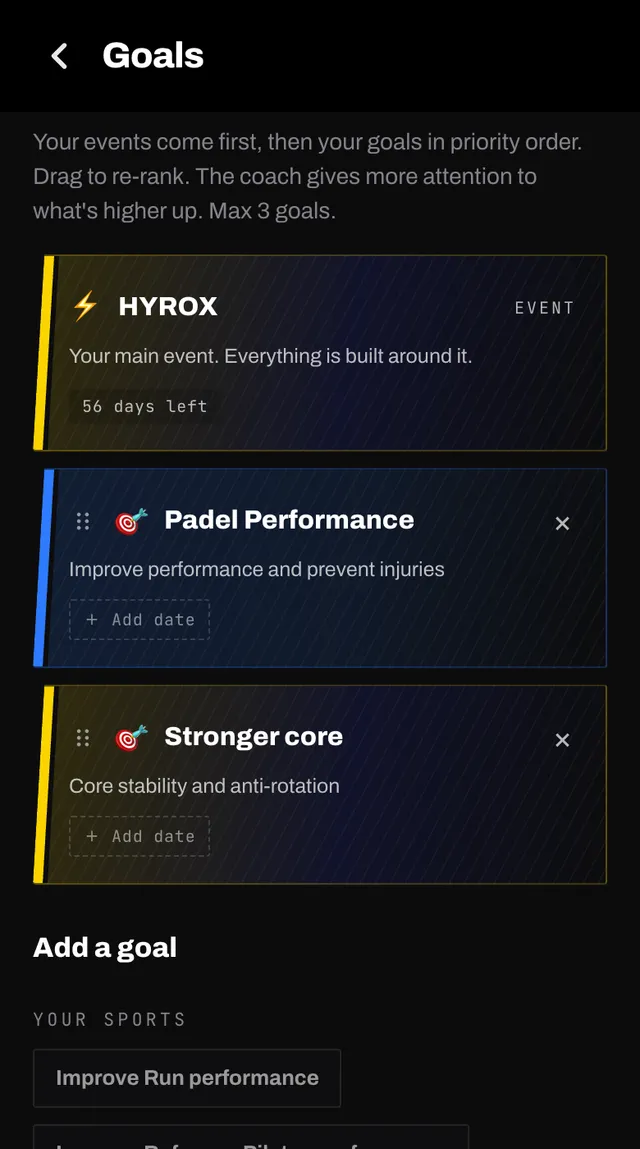
Under Add a goal you get three ways in. YOUR SPORTS offers a performance goal for each sport you do. OTHER GOALS offers common ones such as a pull-up, a stronger core or running faster. Or type your own and your coach checks it reads as a training goal before adding it.
Each goal can carry a target date. Tap Add date on its card. Without one your coach just works on it steadily.
Press and hold the grip handle on a card, then drag it up or down. The higher it sits, the more of your training goes to it.
The event card at the top cannot be moved or removed from here. Races are managed separately.
At the cap, the add section is replaced by a note from your coach: Three goals is the most I can really move the needle on at once. Drop or deprioritise one first, which one gives?
Performance goals for your sports count towards the three, so switching one on from a sport page can hit the same limit.
Add, remove, re-rank and date changes are collected while you are on the page, and one rebuild fires when you leave it. That way reshuffling three goals costs one rebuild rather than three.
So if you change something and the plan looks untouched, go back to Home. The update starts then, and takes a few minutes.
Open the app, go to You, and tap the feedback row at the bottom. It reaches a person, not a queue. Or write to hello@smashcoach.app.