
Cycle tracking
Your cycle affects strength and energy, so your coach can plan around it. It is entirely optional, it is used for one thing only, and turning it off deletes the data immediately.
Your cycle affects strength and energy, so your coach can plan around it. It is entirely optional, it is used for one thing only, and turning it off deletes the data immediately.
On the You tab, find the cycle card and tap + ADD. It is offered if your profile says female, and it stays available to anyone already tracking.
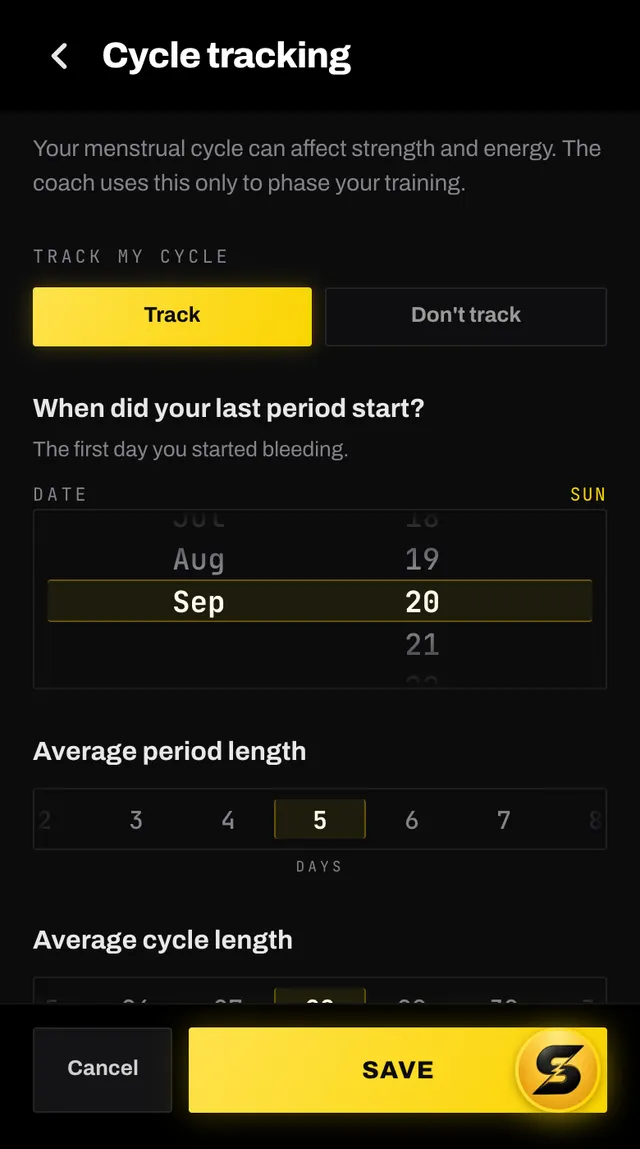
Switch TRACK MY CYCLE to Track, then answer what you can: when your last period started, your usual period and cycle lengths, whether your cycles are regular, and whether you use hormonal contraception. Only the date is required.
The card shows your cycle day, the phase you are in and a one-line note about what that usually means for training. Under DETAILS are the numbers you entered.
Period started today is the quick log to keep it accurate. Edit cycle details changes anything else.
This is the app's own statement, and it is what you agreed to:
Stored only while tracking is on, and deleted the moment you turn it off. Your current phase is included in what your AI coach is told, so it can plan around it. It goes nowhere else.
Your coach is told today's phase only, and your plan runs two weeks ahead, so it leaves the phase out of what it writes into your sessions: a session's name, its note, its focus line and WHY THIS DESIGN, the tips under each exercise and in a warm-up or cool-down, and the name and note it writes when chat adds or changes a session. Sessions written before this came in are left as they were, so an older one can still mention one.
Open the edit screen, switch to Don't track, and a red panel names exactly what will be deleted. Tap Save, and then tap Save again to confirm.
The two taps are deliberate. Deleting this cannot be undone, and one stray tap should not do it.
Open the app, go to You, and tap the feedback row at the bottom. It reaches a person, not a queue. Or write to hello@smashcoach.app.