
What you can ask your coach
The gold circle opens a conversation with the coach that wrote your plan. It already knows your week, so you can get straight to the point.
The gold circle opens a conversation with the coach that wrote your plan. It already knows your week, so you can get straight to the point.
Tap the gold circle at the bottom right of Home, Agenda, You or any workout screen, or the Talk to your coach link at the foot of those pages. Close it with the cross, by tapping outside it, or by dragging it down.
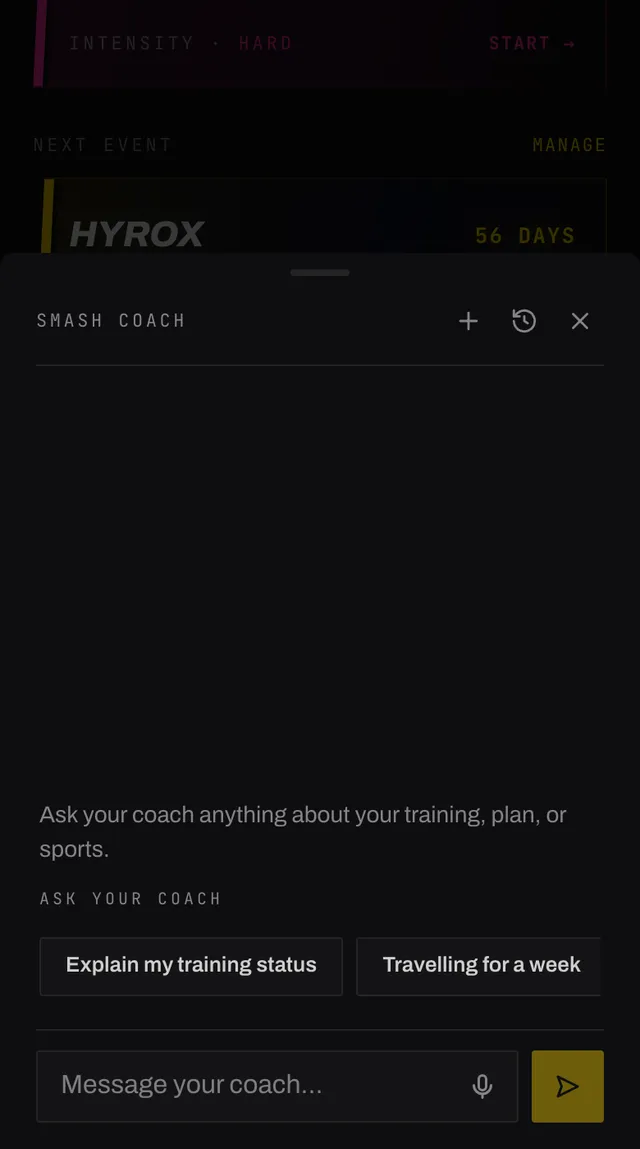
The chips above the message box are shortcuts to whole questions, and they follow where you opened the chat from. On Home they are about your training status and the week ahead. On Agenda they are about rebalancing and rest. On a workout they are about that session, such as shortening it or making it harder.
Open the chat from a session you have already finished and the chips change again, to questions about how it went. A finished session cannot be rewritten, so it is not offered.
Your coach can reschedule a session, skip one, add one, remove one, change what is in one, add or remove an exercise, and rebuild your whole plan. Every one of those shows you a confirmation card first, which is covered on the next page.
Leave the details open, like asking for a short extra session this week, and your coach picks them from your plan and shows you the card. Confirm it, dismiss it, or ask for something different.
For things that have their own screen, such as goals, injuries, sports and races, it gives you a link straight to the right page rather than doing it blind.
It is a training coach and it stays inside that. It will not diagnose an injury or suggest treatment, and it will not give you nutrition advice beyond fuelling around a session.
Ask it something well outside training and it says so plainly and invites you back to your plan. That is not a fault, it is the boundary.
If you have reported a pregnancy, every message gets the same answer: it is not the right coach for that yet, and how to switch to postpartum once you are no longer pregnant.
Chats are kept. Reopening picks up where you left off, the clock icon shows your earlier conversations by their first line, and the plus starts a fresh one. Nothing is storeduntil you send your first message.
Your coach also keeps short notes about durable things you tell it, such as an exercise you love or a standing commitment. You can read and delete every one of them under You, Settings, Collected personal data.
Open the app, go to You, and tap the feedback row at the bottom. It reaches a person, not a queue. Or write to hello@smashcoach.app.