
Send feedback
Something broken, or an idea. It reaches a person rather than a queue, and you choose whether your name comes with it.
Something broken, or an idea. It reaches a person rather than a queue, and you choose whether your name comes with it.
Go to You and scroll to the bottom. Under FEEDBACK there is a row reading Something broken? Have an idea? Tap it.
Choose Something went wrong or A suggestion, write your message, and send. You can dictate it with the microphone instead of typing.
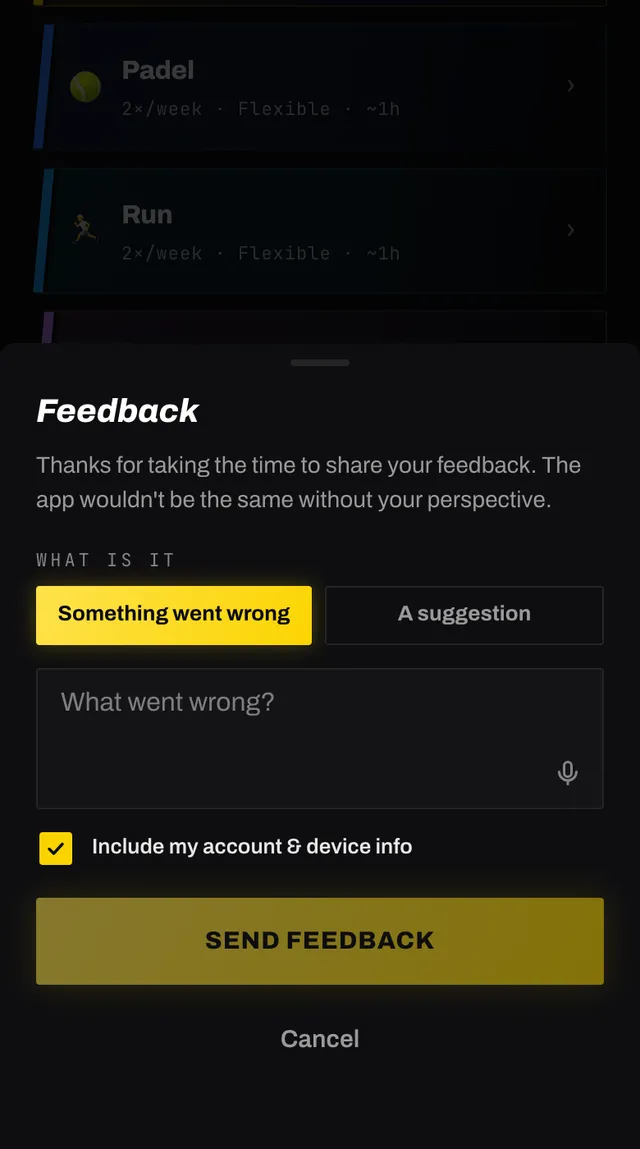
Include my account and device info is on by default. With it on, your email and some device details come along, which is what lets us write back and work out what went wrong.
Turn it off and the message is stored with no link to you at all. Not hidden, not pseudonymous, genuinely unattached. Use that if you want to say something blunt.
The trade is that we cannot reply, and we cannot look up your account to see the problem.
Always: what kind of feedback it is, your message, the date and the app version.
Only while the toggle is on: your email address, taken from your signed-in session rather than anything you type, and a snapshot of your browser, device type, screen size, language and timezone.
Anything broken, anything confusing, anything missing. It is also the correction route for the profile fields you cannot edit, such as a wrong date of birth or height.
If you would rather use email, write to hello@smashcoach.app.
Open the app, go to You, and tap the feedback row at the bottom. It reaches a person, not a queue. Or write to hello@smashcoach.app.