
Skip to content

Your personal information

Most of your profile can be changed whenever you like. Three fields cannot, and there is a reason for each.

Where it is

You, then Settings, then Personal information.
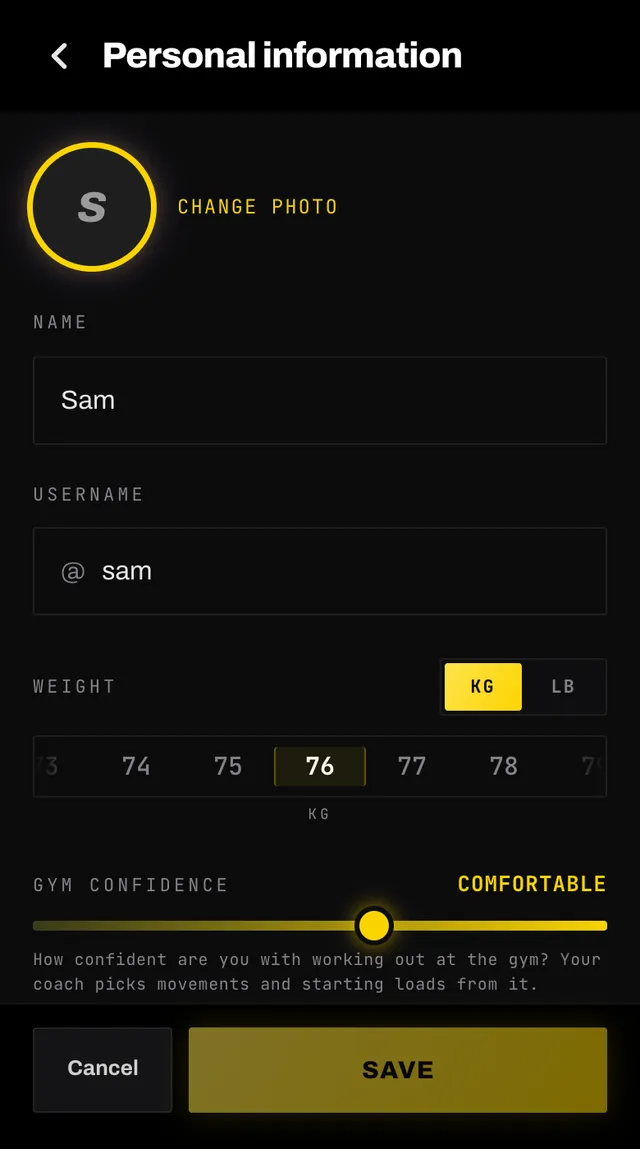
The personal information screen with a profile photo, name and username fields

What you can change

  • Your photo. Upload one under five megabytes, or remove it. You can do this from the You header too.
  • Name and username. The username checks itself as you type and tells you whether it is free. Your first one comes from the name you gave when you signed up, with a number added if someone already had it. Change it whenever you like.
  • Weight, in kilograms or pounds.
  • Gym confidence, which shapes the movements and starting loads your coach picks.
  • Resting heart rate, longest run and, from 5 km up, your time for it. The heart rate and the time both have a Don't know option, and your coach estimates them instead.

Nothing is saved until you tap Save at the bottom.

What you cannot

Date of birth, gender and height are set once at sign-up and shown at the bottom of the screen for reference.

Your birth date decides whether you are old enough to use the app, so it is not something to edit casually. Gender and height feed into how your coach programs and which illustrations you see.

If one of them is wrong, tap the Tell us link under them. It opens the feedback form and reaches a person who will correct it.

Your email address

Shown here but not editable. Once an address is confirmed there is no way to change it in the app. Write to hello@smashcoach.app if you need it changed.

If your address has not been confirmed yet, the Confirm your email task on Home can resend the link or change the address.

Common questions

Why can I not change my date of birth or height?
They are set once at sign-up. Your birth date decides whether you are old enough to use the app, and your height and gender feed into how your coach programs. If one is wrong, use the Tell us link on that screen and we will fix it.
How do I change my email address?
Once an address is confirmed there is no way to change it in the app. Write to hello@smashcoach.app. If your address is not confirmed yet, the Confirm your email task on Home lets you change it.
My username is taken.
Try another. The field checks as you type and tells you whether it is free. Letters, numbers, hyphens and underscores only, and no spaces.
Why does my username have a number on the end?
It was made from the name you gave when you signed up, and someone already had that one, so we added a number rather than stopping to ask. Change it any time from You → Personal information.
What is gym confidence for?
It tells your coach how familiar you are with a gym, which it uses to choose movements and starting loads. Move it as you get more comfortable.
What size photo can I upload?
Under five megabytes, as a JPEG, PNG or WebP. You can also remove a photo entirely.

Still stuck

Open the app, go to You, and tap the feedback row at the bottom. It reaches a person, not a queue. Or write to hello@smashcoach.app.