Linking your Garmin Connect account sends every activity you record on your Garmin to your plan, and puts last night's readings on Home each morning. It takes about a minute, on your phone, and it is a separate connection from the watch app.
Account or watch app?
Two connections, two jobs. The watch app puts your next sessions on your wrist and runs them there. The account works the other way: anything you record on your Garmin, with or without the watch app, reaches Smash Coach, along with your sleep, HRV, Body Battery and resting heart rate. You can have either, or both.
You need a Garmin Connect account, which every Garmin watch has, and the watch synced to the Garmin Connect app on your phone as usual.
Connect the account
1
Open the Garmin account screen
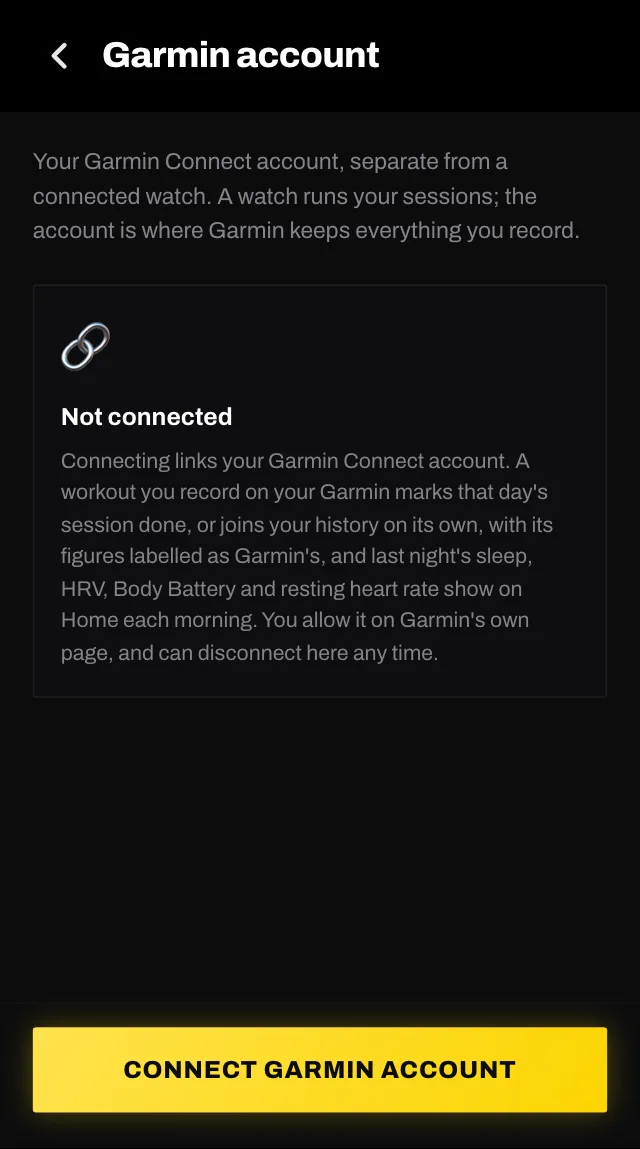
On your phone, go to You, then Settings, then Garmin account. It sits beside Garmin watch, which is the other connection. Until you connect one, a Connect your Garmin account task on your Home screen goes to the same place.
You, then Settings, then Garmin account.
2
Read the agreement and tap I agree
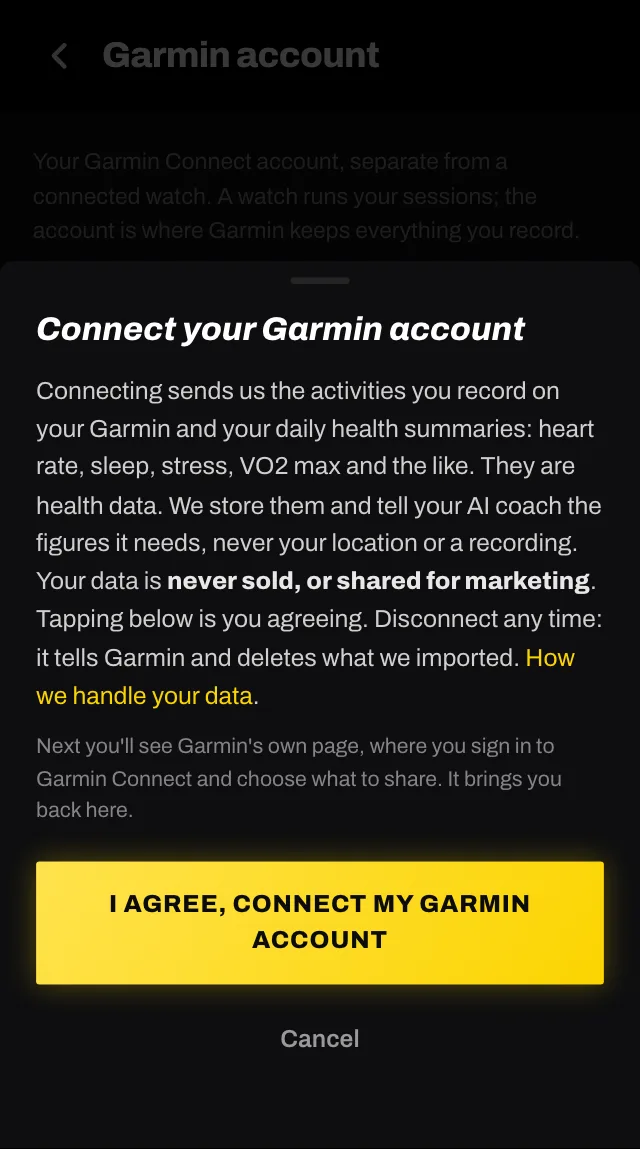
Tap CONNECT GARMIN ACCOUNT. A sheet says what connecting sends us and that it is health data; tapping I agree, connect my Garmin account is you agreeing. Nothing is stored before that tap.
The agreement, with a link to how we handle your data.
3
Sign in on Garmin's page and choose what to share
Garmin's own page opens. Sign in to Garmin Connect, tick what you want to share, and agree. Garmin may show a notice that Smash Coach is not yet verified by Garmin: that is Garmin's review queue for new partners, not a fault, and the connection works the same.
4
Back in the app, it reads Connected
Garmin's page brings you back to Smash Coach with the message Garmin account connected. The screen now shows what you chose to share and when data last arrived. Nothing arrives until your watch next syncs, so the first figures appear after your next workout or your next morning.
What arrives
Your workouts. A workout you record on your Garmin arrives as a summary: the sport, the time, the distance, the heart rate. If it is the kind of session planned for that day and roughly the same length, it marks that session done and the figures sit on its page, labelled as Garmin's. Otherwise it joins your history as its own session. Walks and anything under ten minutes are left out. A session completed this way asks how it felt, once, so your coach has your side of it.
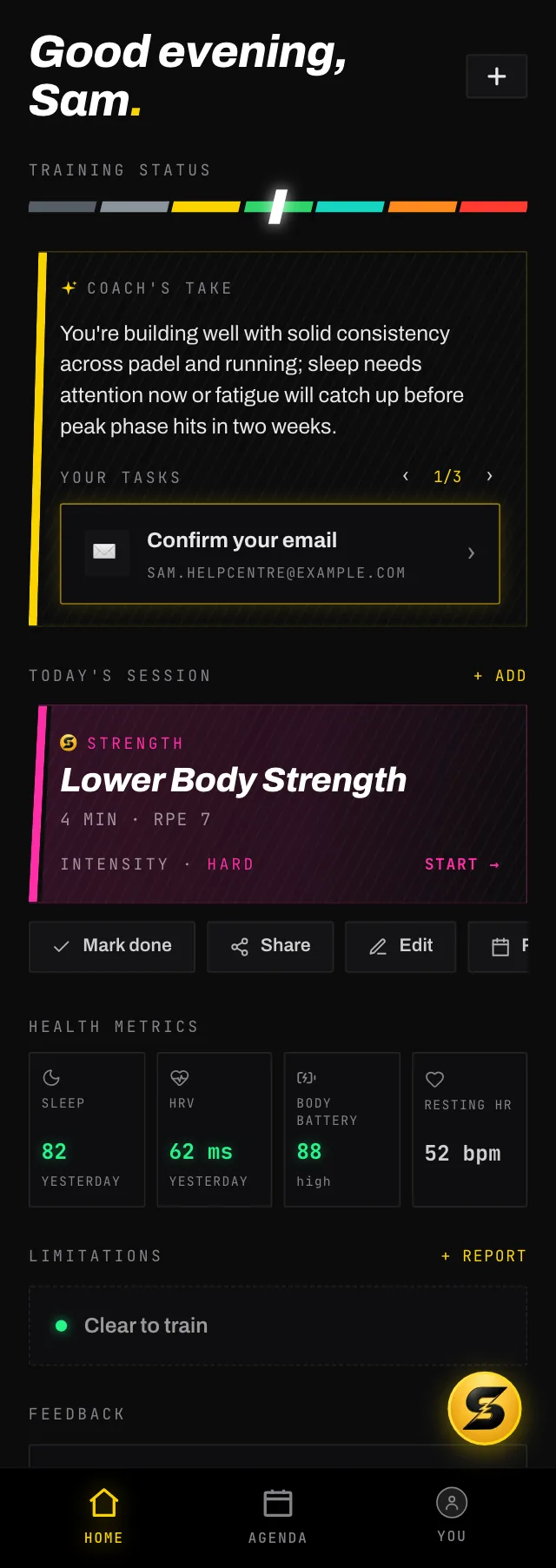
Health metrics. On Home, after today's session, HEALTH METRICS shows last night's sleep score, your HRV, your Body Battery and your resting heart rate, each coloured by how it stands: Garmin's own bands for sleep and Body Battery, your own weekly average for HRV, your own usual for resting heart rate. Tap a reading and it opens on its own: the figure large, how it stands, its last seven days as a graph, a dash for a day Garmin sent nothing, what it is, its bands and what your coach does with it, under the name of the Garmin it came from.
HEALTH METRICS follows today's session. Tap a reading for its week and what it means.
What your coach does with it. It reads last night's sleep, HRV and resting heart rate and may shade today's advice in words, on Home and in chat. It never moves or changes a session because of a reading, and no figure reaches a notification.
The rest, your VO2 max, weight, steps and intensity minutes, is listed on the Garmin account screen under your device's name, with the day each came. A changed VO2 max or resting heart rate also joins your fitness profile, labelled with your device.
When it does not work
Sleep or HRV shows a dash. They arrive once, on the first sync after you wake. If the line under the strip says Waiting for your watch to sync, open the Garmin Connect app on your phone to force a sync. If it says Garmin hasn't sent Sleep and HRV yet, the watch has synced but Garmin has not sent the night: HRV needs the watch worn overnight for a few nights before Garmin reports it at all.
That took too long, so Garmin's page expired. Start again from here. Garmin's page is only good for a few minutes. Tap CONNECT GARMIN ACCOUNT again.
That Garmin account is already connected to another Smash Coach account. One Garmin account, one Smash Coach account. Disconnect it there first.
Needs reconnecting. Garmin's permission runs out after about three months. Tap RECONNECT GARMIN ACCOUNT and go through Garmin's page again; nothing already imported is lost.
Couldn't check your Garmin connection. This is about the connection to Smash Coach, not your Garmin. Wait a moment and try again.
Disconnecting
Tap Disconnect on the Garmin account screen. It tells Garmin to stop sending, and deletes everything we imported from it: the workouts' figures, the daily readings and the fitness-profile entries that came from Garmin. The sessions themselves stay in your history. Removing Smash Coach from the connected apps in Garmin Connect does the same from Garmin's side.
Common questions
Do I need the watch app as well?
No. The account sends what you record on your Garmin to Smash Coach; the watch app sends your sessions to the watch and runs them there. Each works without the other, and most people end up with both.
How often does data arrive?
Whenever your watch syncs with Garmin Connect. Sleep and HRV come once, on the first sync after you wake. Resting heart rate, steps and Body Battery are updated through the day with each sync. A night your watch never synced cannot be fetched later.
Why is a reading coloured orange or red?
Sleep and Body Battery use Garmin's own bands: a sleep score of 80 and over is good, 60 to 79 fair, under 60 poor; Body Battery 76 and over is high, 51 to 75 medium, 50 and under low. HRV is compared with your own weekly average and resting heart rate with your own usual over the last two weeks, so both need a week or two of nights before they take a colour. The colour is the figure's, not a verdict on your day: your coach reads the figures and may shade its advice in words, nothing more.
Does a bad night change my plan?
No. Your coach may mention it in its take on Home or in chat and suggest holding back in words. It never moves, shortens or rewrites a session because of a reading, and you can always tell it how you feel in chat.
Is my Garmin data sold or shared?
No. It is health data, stored for your plan and shown to the AI coach as the figures it needs. It is never sold or shared for marketing, and disconnecting deletes what was imported. How we handle your data has the full list of who processes it.